
Download Auto Clicker Typer – Free Auto Clicker & Typer for Windows, Mac, Android, iOS
Auto Clicker Typer is a free automation tool designed to help users streamline repetitive tasks by recording and replaying mouse clicks and keyboard inputs. Whether you're a gamer looking to speed up grinding sessions or a professional needing to automate routine data entry, this software offers a simple yet powerful solution. With its intuitive interface and built-in recording function, Auto Clicker Typer lets you capture your exact movements and keystrokes, then repeat them seamlessly.
Despite its lightweight design, the app delivers robust functionality, making it a top choice for those seeking efficient automation tools across Windows, Mac, Android, and iOS platforms. The software is completely free to download and use, with no hidden costs or trial limitations. However, users should be aware that some antivirus programs may flag it due to its keylogging capabilities—though it is safe when used responsibly.
With regular updates and strong community support, Auto Clicker Typer remains a reliable option for automation enthusiasts.
Key Features of Auto Clicker Typer
Auto Clicker Typer stands out in the crowded automation space thanks to its comprehensive yet user-friendly feature set. One of the most powerful tools is the built-in recording function, which allows users to simply perform the actions they want to automate—clicking buttons, typing text, or navigating menus—and the software captures every move with precision. This eliminates the need for complex scripting or manual configuration, making it ideal for beginners and casual users alike.
Another standout feature is the auto-script function, which enables users to create custom sequences of actions with customizable delays, loops, and triggers. Whether you're automating repetitive form submissions, bulk file renaming, or in-game grinding, you can define exactly how many times a sequence runs and when it starts or stops. The software also supports hotkey activation, allowing you to start or pause automation with a single key press—perfect for multitasking environments.
For advanced users, the app offers script editing mode, where you can manually tweak recorded actions for greater control. You can adjust timing, insert conditional logic, or even integrate external commands. Additionally, Auto Clicker Typer includes real-time preview of recorded actions, so you can test your automation before running it.
This helps prevent errors and ensures accuracy. The interface is clean and minimal, reducing clutter while keeping all essential tools accessible. With support for multiple operating systems and regular updates, this tool continues to evolve to meet user needs.
How to Install and Use Auto Clicker Typer
Getting started with Auto Clicker Typer is straightforward, whether you're using Windows, Mac, Android, or iOS. First, download the software from the official website. The file is lightweight and installs quickly—no lengthy setup process is required. Once installed, launch the app and grant any necessary permissions, especially on macOS where security settings may prompt you to allow accessibility access.
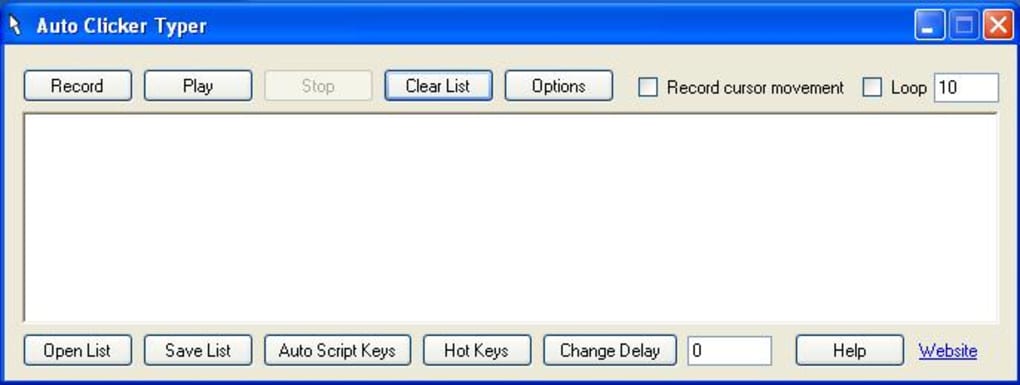
To begin automating, click the Record button and perform the actions you want to repeat—such as typing a message, clicking through a menu, or navigating a webpage. The software captures every keystroke and mouse movement. After recording, you can preview the sequence to ensure accuracy. If needed, use the editing tools to adjust timing, remove unwanted actions, or add delays between steps.
Next, define your loop settings—how many times the sequence should repeat, whether it should run continuously, or if it should stop after a specific condition. You can also assign a hotkey to start or pause automation instantly. For example, pressing Ctrl+Shift+A could trigger your auto-click sequence. When everything is set, click Play and let the software do the work. The interface remains responsive, so you can continue using your computer normally while automation runs.
For best results, test your script on a non-critical task first. Avoid using the tool on sensitive applications like banking software or official game clients unless you’re certain it won’t violate terms of service. Always keep your software updated to ensure compatibility and security.
Compatibility & System Requirements
Auto Clicker Typer is designed to work seamlessly across multiple platforms, making it one of the most versatile automation tools available today. It supports Windows 7 and later, including Windows 10 and Windows 11, ensuring compatibility with both older and modern systems. On Mac, it runs on macOS 10.14 (Mojave) and newer, including Apple Silicon (M1/M2) Macs with native support. This means no need for Rosetta emulation, ensuring smooth performance.
For mobile users, the app is available on Android 6.0 and above, offering automation features tailored for touchscreens. On iOS, the tool is accessible via compatible apps and requires appropriate permissions for automation, such as those granted through Shortcuts or third-party automation platforms. While full desktop-level functionality isn't available on mobile, the core features—like tap automation and text input—work reliably.
The software has minimal system requirements: a standard processor, 512MB RAM, and 100MB of free disk space. It doesn’t require high-end hardware, making it suitable for older machines. The app runs in the background with low CPU and memory usage, so it won’t slow down your system. Regular updates ensure ongoing compatibility with new OS versions and security patches. Whether you're a student, professional, or gamer, Auto Clicker Typer adapts to your workflow across devices.
Pros and Cons of Auto Clicker Typer
- Pros:
- Free to download and use with no hidden fees
- Intuitive recording interface—no coding required
- Supports multiple platforms: Windows, Mac, Android, iOS
- Customizable loops, delays, and hotkey triggers
- Low system resource usage
- Regular updates and active developer support
- Cons:
- Some antivirus software may flag it as suspicious due to keylogging features
- May not work reliably within protected environments (e.g., Steam games, DRM-protected apps)
- Advanced scripting requires some learning curve
- Mobile version lacks full desktop functionality
- Occasional timing inconsistencies in complex sequences
Frequently Asked Questions (FAQ)
-
Is Auto Clicker Typer safe to download and use?
Yes, Auto Clicker Typer is safe when downloaded from the official website. While some antivirus programs may flag it due to its ability to record keystrokes, it does not transmit data or install malware. Always scan the file before installation and ensure you’re using the latest version.
-
Can I use Auto Clicker Typer on Steam games?
It may work on DRM-free games, but many Steam games use anti-cheat systems that detect automation tools. Using Auto Clicker Typer in such games could result in a ban. Use it responsibly and only on games that allow automation.
-
Does Auto Clicker Typer work on Mac with Apple Silicon?
Yes, the app fully supports Apple Silicon Macs (M1/M2 chips) with native performance. No emulation is needed, ensuring fast and reliable automation.
-
Can I edit recorded scripts after recording?
Absolutely. Auto Clicker Typer includes a script editor where you can modify timing, remove actions, add delays, or insert conditional logic for advanced automation.
-
Is there a paid version of Auto Clicker Typer?
No, the software is completely free to download and use. There are no premium features or subscription plans. The developers rely on community support and donations.
Conclusion: Is Auto Clicker Typer Worth It?
If you're looking for a free, secure, and powerful automation tool to simplify repetitive tasks, Auto Clicker Typer is an excellent choice. Its recording and scripting features make it accessible to beginners while offering enough depth for advanced users. Whether you're automating form filling, speeding up game grinding, or streamlining daily workflows, this software delivers real value.
While it may not work in all environments—especially those with strict anti-cheat protections—it remains one of the most reliable free automation tools available. With strong cross-platform support, low system demands, and regular updates, it’s a smart addition to any digital toolkit.
Download Auto Clicker Typer today and start saving time with just a few clicks. It’s free, secure, and ready to help you work smarter—not harder.







